The landlord spreadsheet that adds up your Schedule E for you.
Log rent and expenses for up to 10 rentals. Landlord Ledger sorts every dollar onto the right Schedule E line. It also works out your depreciation, tracks leases and deposits, and shows monthly cash flow. One-time $12. No subscription, no bank login.
- Instant download
- Works in Excel & Google Sheets
- 30-day money-back guarantee
- Your data stays in your file
January shouldn't start with a shoebox of receipts.
“Which line does this go on?”
HOA fees, pest control, a new water heater thermostat. Each one belongs on a specific Schedule E line. Guessing in March takes hours, or your CPA bills you for those hours.
Depreciation gets skipped
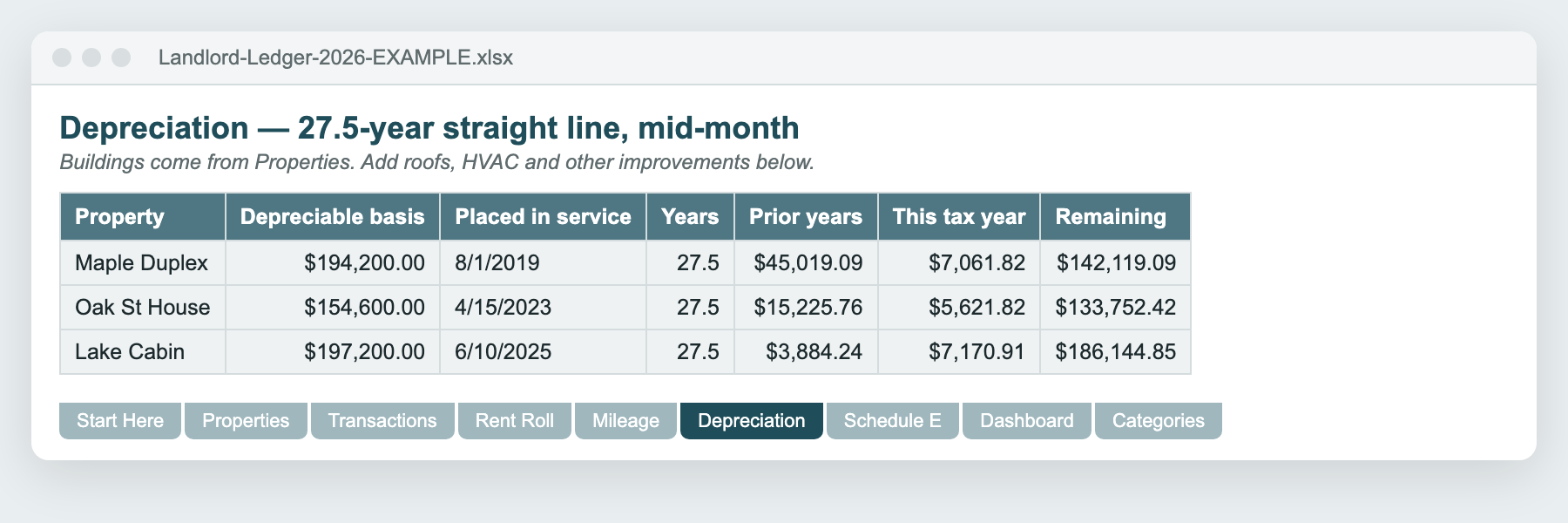
It's often the biggest deduction a landlord has, and many small owners never calculate it. The 27.5-year, mid-month math is fiddly. The spreadsheet does it for the building and every improvement.
Software wants a monthly fee
Rental platforms are great at 50 doors. At 1–10 doors many owners just want a clean ledger they own, without connecting a bank or paying every month.
What's inside the workbook
Nine tabs. Yellow cells are where you type. Grey cells calculate on their own.
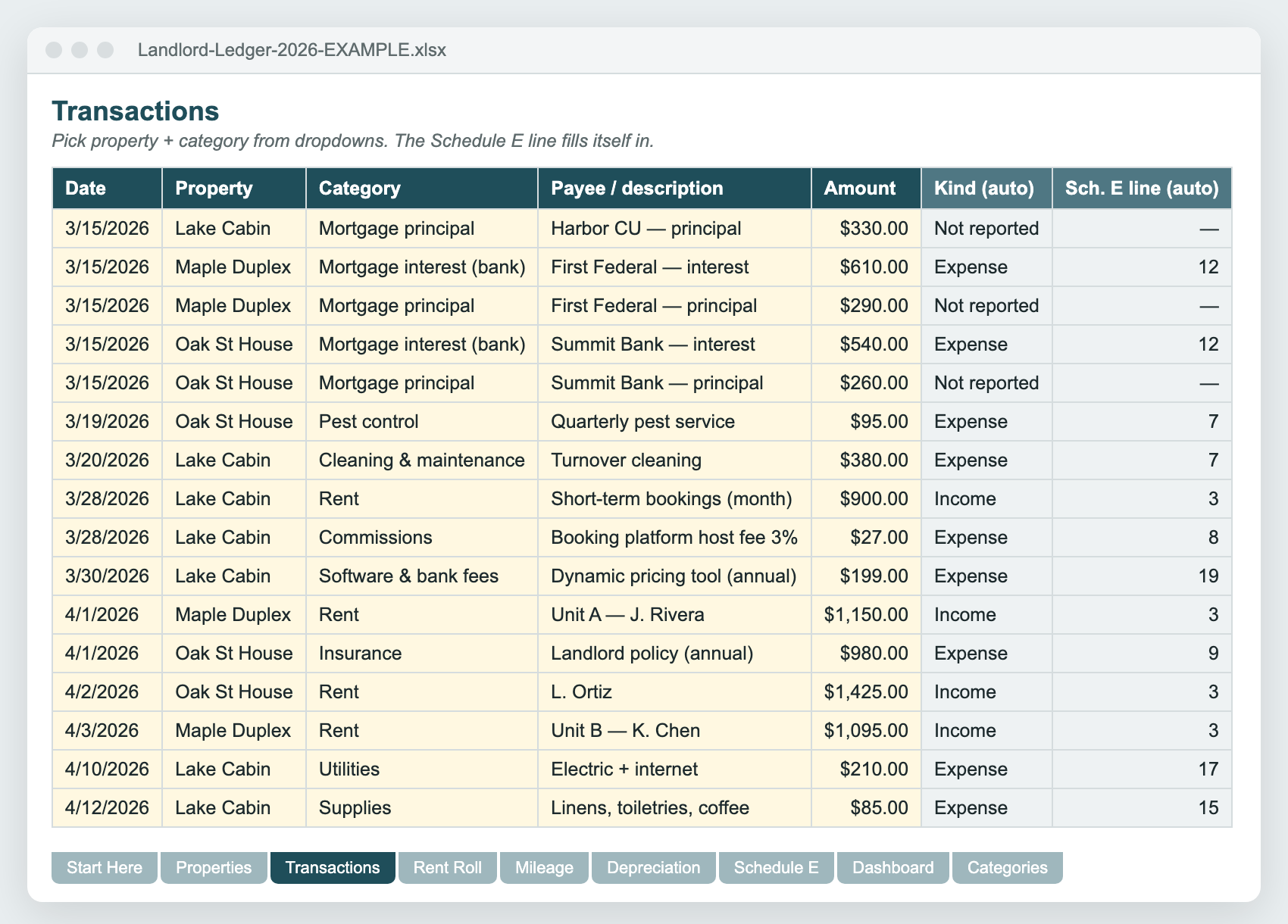
- TransactionsOne ledger for every property, 1,500 rows. Pick property and category from dropdowns, and the Schedule E line fills itself in.
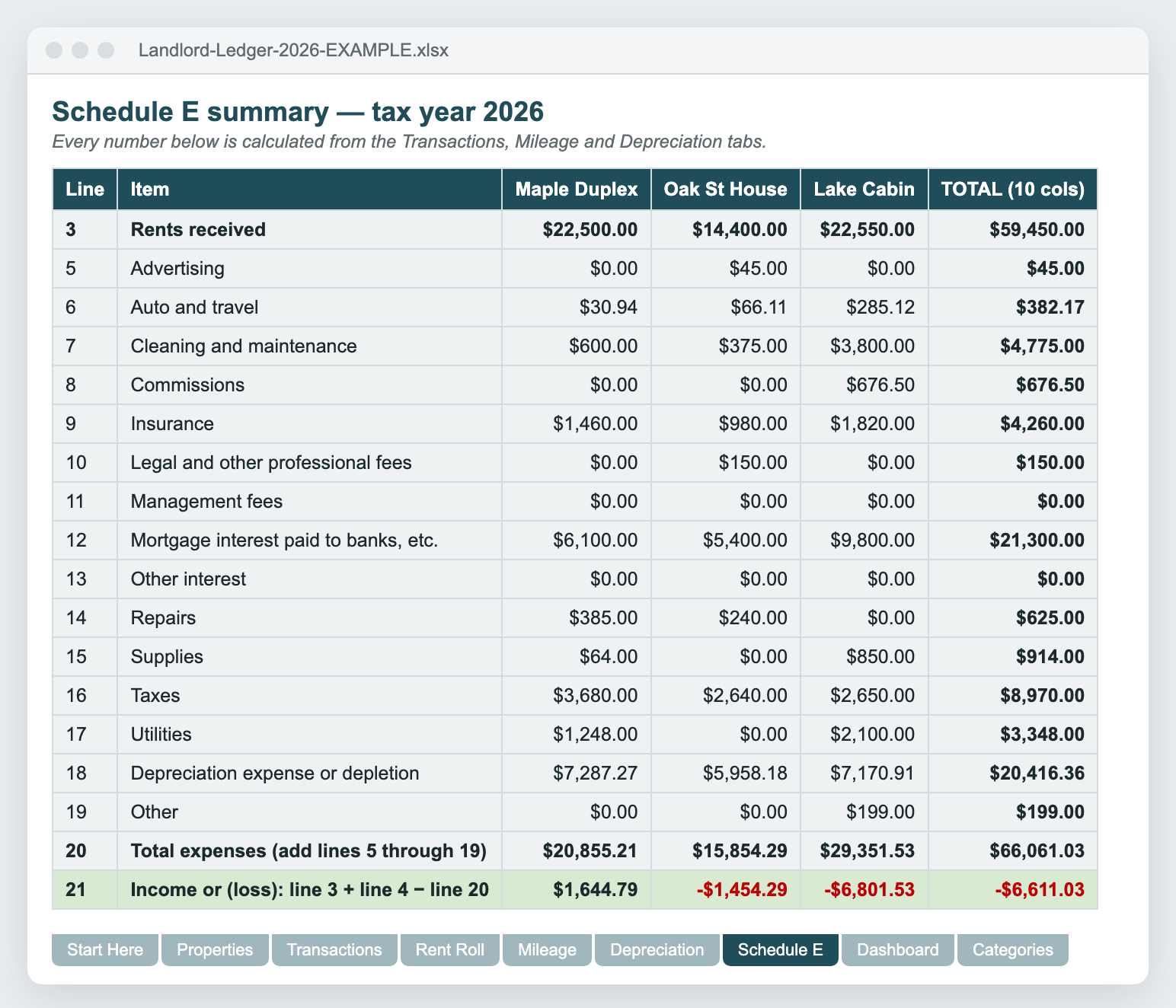
- Schedule E summaryLines 3–21 per property plus a total, ready to copy into Form 1040 Schedule E.
- DepreciationBuildings and capital improvements: straight-line, 27.5 or 39 years, mid-month convention, prior years and this year.
- DashboardMonthly income, operating expenses, NOI and real cash flow, for all properties or one, with a chart.
- Rent RollTenants, lease dates, rent and deposits held. Leases ending within 60 days are flagged automatically.
- MileageTrips to your rentals. It applies the right IRS rate by trip date, including the July 1, 2026 change from 72.5¢ to 76¢.
- PropertiesUp to 10 rentals: Schedule E type code, rental days, personal-use days, purchase price, land value.
- Categories28 landlord categories mapped to Schedule E lines, with plain-English examples. Rename them or add your own.
- Example fileA second copy filled with a realistic sample portfolio so you can see how everything connects.
Type it once. Everything else updates.
Enter a payment: date, property, category, amount. The Schedule E summary, the dashboard and the cash-flow numbers recalculate instantly. Security deposits, mortgage principal and capital improvements are tracked for cash flow but kept off your Schedule E, where they don't belong.
Every screenshot on this page shows the actual example file, with values calculated by the workbook's own formulas.
See where the money actually went
The dashboard separates taxable results (after depreciation) from cash results (after mortgage principal and improvements). That's the difference between “I made money” and “my bank account went down”, and it's the question every small landlord asks in December.
Get the full version — $12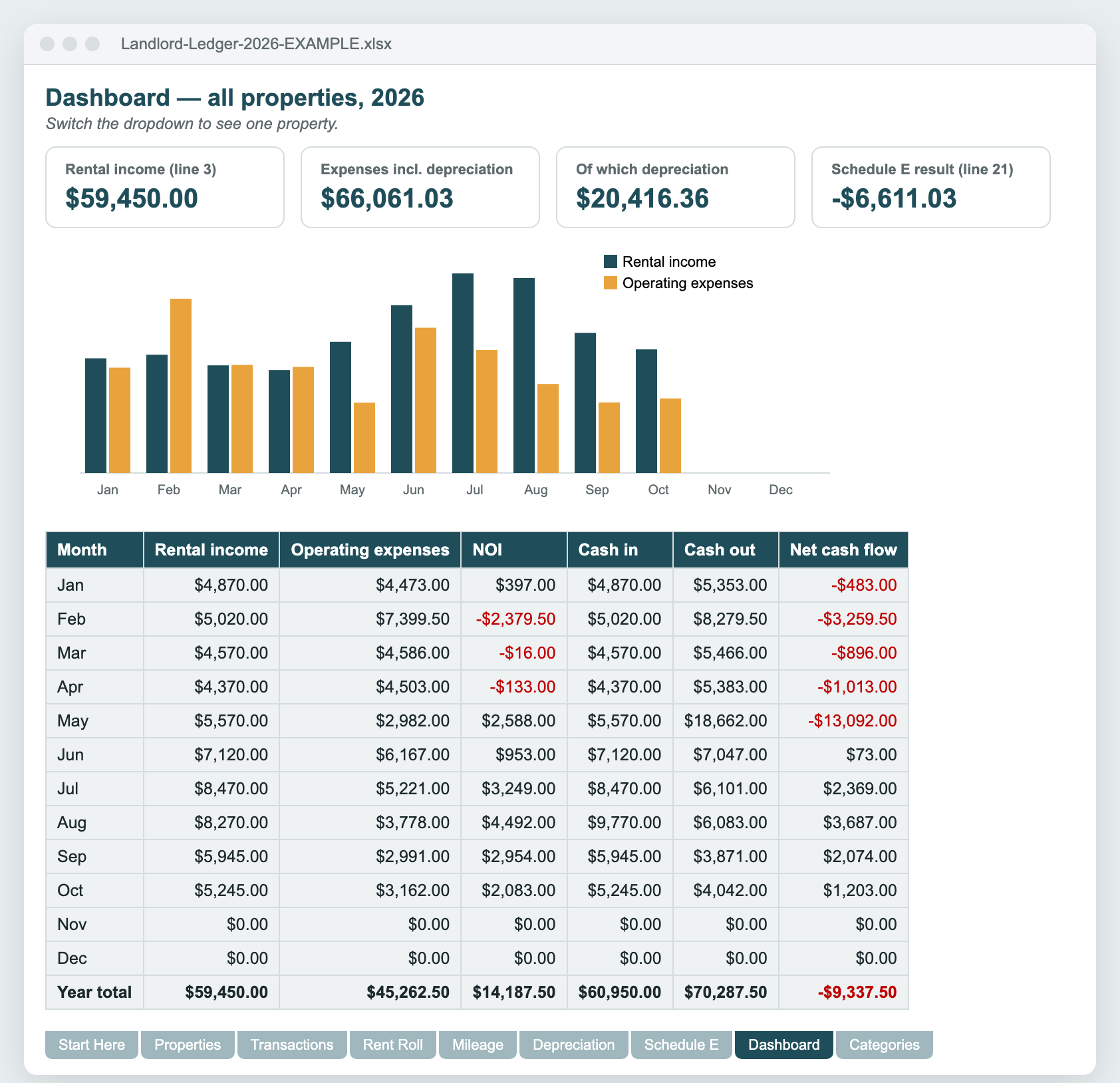
How it compares
| Landlord Ledger | Rental software subscription | DIY blank spreadsheet | |
|---|---|---|---|
| Cost | $12 once | Free tiers exist; premium tiers bill monthly | Free, plus your evenings |
| Schedule E line mapping | Built in, per property | Usually | You build it |
| Depreciation (27.5-yr, mid-month) | Buildings + improvements | Varies by plan | You build it |
| Bank sync / tenant portal | No, by design | Yes | No |
| Who holds your data | You, in one file | The vendor | You |
Is it right for you?
Great fit if you…
- own 1–10 long-term or short-term rentals in the US
- file Schedule E yourself or hand clean totals to a CPA
- are comfortable typing into a spreadsheet
- prefer a one-time purchase to another subscription
Probably not for you if you…
- manage 20+ units or other people's properties
- want automatic bank imports or online rent collection
- need state-specific tax forms or accrual accounting
- want tax advice. This organizes records, it doesn't replace a tax pro
Landlord Ledger 2026
- Excel workbook (.xlsx) that imports cleanly into Google Sheets
- Example file with a sample 3-property portfolio
- Up to 10 properties, 1,500 transactions
- Free fixes and updates to the 2026 edition
- 30-day money-back guarantee
Not ready? Download Lite free (1 property, ledger + Schedule E). Checkout by Gumroad, which handles payment and sales tax/VAT.
Questions
Does it work in Google Sheets?
Yes. In Google Sheets choose File → Import → Upload, pick the .xlsx and select “Replace spreadsheet”. The workbook only uses functions both Excel and Google Sheets support (SUMIFS, INDEX/MATCH, LOOKUP), and dropdowns, formulas and the chart carry over.
Which Excel versions are supported?
Excel for Microsoft 365, Excel 2016 or newer on Windows and Mac, and Excel for the web. Apple Numbers can open the file, but it isn't officially supported.
Is this tax advice?
No. Landlord Ledger organizes your records and totals them the way Schedule E asks for them. Tax rules change, and passive-loss limits, co-ownership and state rules can affect your return. Review the numbers with a qualified tax professional before you file.
Does it handle Airbnb / short-term rentals?
Yes. Mark the property as type 3 (vacation/short-term), log bookings as rent and platform fees as an expense, and record fair-rental and personal-use days. If your average guest stay is 7 days or less, or you provide hotel-like services, ask a tax pro whether the activity belongs on Schedule E.
I have more than 10 properties. Will it work?
Each workbook holds 10 properties side by side. With more, use a second copy for properties 11–20. Schedule E itself fits three properties per page, so you'd attach extra pages anyway.
Can I use it for the 2027 tax year?
Yes. Change the tax year on the Start Here tab and every total recalculates for that year. We recommend a fresh copy for each tax year so last year's file stays as your record. Buyers get a discount on future editions.
What if it isn't right for me?
Reply to your Gumroad receipt within 30 days and you'll get a full refund, no questions asked.
Where does my data go?
Nowhere. The workbook is a file on your computer or in your own Google Drive. There's no account, no bank connection and no tracking inside the file.
How do I get the files?
Right after checkout Gumroad shows a download page and e-mails you a link. You get the blank workbook and the example file filled with sample data.
Cash or accrual?
Cash basis: income is counted when you receive it and expenses when you pay them. That's how most individual landlords report on Schedule E.
Free: rental depreciation calculator
Not sure what your depreciation should be? Enter your purchase price, land value and placed-in-service date and get the full 27.5-year schedule. No email needed.
Open the calculator